
Lab Notes

  • A Few Months, a Lot of Changes

    Well, it’s been a while.

    Our last update was back in July, when we announced that BakBeat 1.3.0 was available for macOS.

    As I write this, we’ve just released BakBeat 1.12.0.

    So, yeah. We’ve been busy.

    One of the challenges of building software in your spare time is that sometimes you get so caught up in actually building the thing that you forget to tell people what you’ve been doing.

    Let’s fix that.

    BakBeat Has Grown Up

    When we launched BakBeat publicly in July, it was already capable of managing music libraries, working with several generations of iPods, and transferring music to MiniDisc players.

    Since then, we’ve released update after update, expanding device support, improving the library, fixing bugs, and gradually turning BakBeat into something much larger than the application we originally released.

    Some of that work has been visible.

    A lot of it hasn’t.

    We’ve spent considerable time rebuilding pieces underneath the interface so that BakBeat has a solid foundation for everything we want to do next.

    Because the goal isn’t just to make another music player.

    It’s to build the kind of application that used to exist when owning a music collection actually meant something.

    More Devices, More Possibilities

    One of our original goals was to bring something resembling the classic iTunes experience back to devices that modern software has largely forgotten.

    We’ve continued expanding our supported hardware, including additional generations of iPods.

    The iPod Classic 7th generation and iPod Nano 3rd generation are among the devices we’ve added since our last update, alongside continued research and testing of Sony Walkman players and other dedicated music hardware.

    And that’s something we’ve learned repeatedly throughout development:

    Old hardware is weird.

    Two devices from the same manufacturer might handle music libraries completely differently. One might rebuild its library automatically after you disconnect it. Another might depend on a particular directory structure or playlist format.

    Rather than guessing, we’re testing actual hardware and documenting what it really does.

    That’s slower than simply declaring that everything works.

    But we’d rather tell you what we know than promise something we haven’t proven.

    Your Library, Your Music

    The BakBeat library itself has also changed considerably.

    We’ve continued improving playlists, imports, metadata, lyrics, device integration, and the relationship between the files you own and the library you see in BakBeat.

    The BakBeat library database is now the authoritative record of your collection.

    That distinction matters.

    We don’t want your library changing unexpectedly because some background process decided it knew better. We want BakBeat to be predictable, understandable, and respectful of a collection you may have spent decades building.

    That philosophy extends to device synchronization, too.

    The goal isn’t simply copying files onto an MP3 player.

    It’s knowing what’s already there, what needs to change, and what the device can actually support.

    And Now… Guitar Tabs

    BakBeat 1.12.0 introduced something a little different: Guitar Tabs.

    You can now keep tablature alongside your music and pull it up while you’re listening.

    This might seem a little outside the original mission of managing a music library and syncing old hardware, but to us, it actually fits perfectly.

    BakBeat has always been about your relationship with the music you own.

    Sometimes that means ripping a CD.

    Sometimes it means putting an album onto an iPod you’ve owned for twenty years.

    And sometimes it means plugging in a guitar, pulling up the tab for a song in your library, and playing along.

    We’re interested in making BakBeat a home for a music collection, not just a place where files happen to live.

    Guitar Tabs are one of the first steps in exploring what that can mean.

    A Lot of Work You Can’t See


    Some of our biggest improvements over the last few months have involved things most users will never notice.

    And that’s kind of the point.

    We’ve spent a lot of time improving BakBeat underneath the interface: breaking apart overly complicated components, making operations more reliable, improving responsiveness, and building a foundation that can continue to grow as the application does.

    It’s not the kind of work that makes for exciting screenshots.

    But it means fewer surprises, fewer bugs, and a much healthier foundation for everything we want to build next.


    What About Windows and Linux?

    They’re still part of the plan, and development has continued.

    One of the reasons we’ve invested so heavily in BakBeat’s underlying architecture is to make supporting multiple operating systems practical.

    We’re not interested in building three unrelated applications that happen to share a name.

    The goal is consistent behavior regardless of which platform you’re using.

    There’s still work to do, and we’re not announcing release dates until we’re confident we can deliver.

    Free Means Free

    One other major thing has changed since our last update:

    BakBeat is free.

    Not “free until you want the useful features.”

    Not “free with a subscription.”

    Free.

    The core BakBeat application is free, and that’s how we intend to keep it.

    No subscription required to manage your music. No cloud account required to access your collection. No artificial restrictions designed to make you pay to use hardware you already own.

    If you enjoy BakBeat and want to support development, voluntary contributions are always appreciated.

    But paying us isn’t a requirement to use it.

    We believe people should be able to enjoy the music they’ve purchased without another company standing between them and their collection.

    What’s Next?

    More devices.

    More improvements to the library.

    More work on Windows and Linux.

    More ways to actually use and enjoy the music you own, like Guitar Tabs.

    And, inevitably, more bug fixes.

    There are decades of perfectly good music players sitting in drawers and on shelves.

    There are people with enormous collections of CDs, digital purchases, carefully curated playlists, lyrics, artwork, and now maybe a few guitar tabs.

    Those collections deserve software built for them.

    That’s why we’re building BakBeat.

    One Last Thing

    If you’ve downloaded BakBeat, tried it, or even just followed along with development, thank you.

    This is still a small, independent project built around a pretty simple idea:

    If you like your music, you can keep it.

    And now, apparently, you can play along with it too.

    Hopefully it won’t take another three months to write the next update.

    — Mike
    BakBeat Labs
  • Updates and Releases!

    So its been FAR too long since I’ve done an update, and its because we’ve been hard at work getting this out there, but the mac version is officially available, and version 1.3.0 is available for download right now!

    This bring Bakbeat to the world, and its ready to be your full music manager! We support several iPod models (and it will continue to grow) and fully support MiniDisc NetMD transfers! This includes SP mode, LP2 and LP4 write modes, and we can import your minidiscs to create a catalog of your discs.
    You can learn more on our Minidisc page here:
    https://www.bakbeat.com/minidisc/

    We would welcome your feedback, and any bugs or issues you encounter so we can continue to improve. Updates are coming as quickly as I can make them so we can expand our device support and improve the usability of the app.

    Screenshots and feature sets can be viewed here:
    https://www.bakbeat.com/features/

    I hope you will enjoy it, and Windows and Linux versions are currently being worked on

  • We Wrote a Track to a MiniDisc

    We Wrote a Track to a MiniDisc

    It finally happened.

    BakBeat successfully wrote a track to a MiniDisc in SP mode—and it plays back correctly on the device.

    No simulation. No partial success. No “almost there.”
    The device accepted the audio, wrote it, and plays it like it should.

    That’s been a long time coming.

    —

    What That Actually Means

    Getting to this point wasn’t just about sending data over USB.

    That write path depends on a bunch of things all working together:

    – Preparing audio in the exact format the device expects
    – Handling the NetMD transport correctly
    – Managing the device session and command flow
    – Sending a full, valid payload the device will actually accept

    If any of those pieces are wrong, the device either rejects it or produces garbage.

    So this isn’t just “we can write files”—it’s:

    > The pipeline is correct enough that a real MiniDisc player trusts what we’re sending it.

    —

    Everything Around It Got Rebuilt Too

    This didn’t happen in isolation.

    A lot of the recent work has been a full cleanup of how BakBeat handles devices and data.

    UI Structure

    We’ve been reworking the macOS app to be more consistent and predictable:

    – One shared structure for device views
    – Clear separation between mass storage devices and MiniDisc
    – No UI logic trying to guess device state

    The UI is back to doing what it should: rendering data, not inventing it.

    —

    MiniDisc Pipeline

    We also moved MiniDisc from “we can talk to it” to “we actually understand it.”

    There’s now a clean path:

    – Read the disc catalog (TOC)
    – Extract track-level data
    – Feed it through the CLI
    – Surface it in the UI

    That pipeline is shared—no duplicate parsing, no special cases.

    —

    Real Device Truth (No Guessing)

    A good example of that is recording mode.

    Instead of guessing based on duration or bitrate, we now read the actual encoding mode from the device for each track.

    Then we apply a simple rule:

    – If every track agrees → we show it
    – If anything is mixed or missing → we show nothing

    So when you see:

    json id=”2g0c9t” “mode”: “sp”

    …it’s coming directly from the device, not a heuristic.

    —

    Device Presence

    We also cleaned up device detection.

    Mass storage devices and MiniDisc used to share too much logic, which caused weird behavior. They’re now separate:

    – USB + mount for mass storage
    – Protocol-based detection for MiniDisc

    Merged at the end, not tangled together.

    Result:

    If the device is there, BakBeat sees it.
    If it’s not, it doesn’t pretend.

    —

    Where We Are Now

    MiniDisc support is in a much better place than it was even a few weeks ago:

    – Device detection is stable
    – Disc catalog reading works
    – Track metadata is coming through
    – Encoding mode is accurate
    – Disc-level mode is derived correctly
    – And we can write a track in SP mode end-to-end

    There’s still a lot left to do—especially around write UX, remaining time, and broader format support—but the hard part is no longer theoretical.

    It works.

    —

    Wrapping Up

    This wasn’t the most visible stretch of work.

    A lot of it was untangling systems, tightening boundaries, and fixing the kind of issues that quietly cause problems later.

    But this result makes it worth it:

    > BakBeat can now write to a MiniDisc and read it back with real, device-backed data.

    That’s a solid place to stop for the night.

    More soon.

  • Proof of life

    A small post, but an important one. We’ve spent alot of time on the foundations of BakBeat. DB models, application states, lots of REALLY dull back end pieces that, while critically important are not exactly flashy.

    But now we finally get to the fun. By no means a final UX, but it proves that our work was worth it.

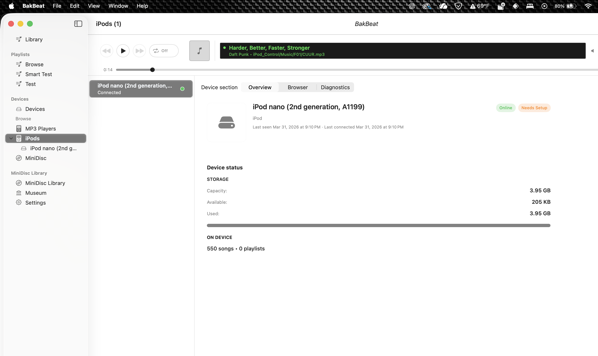
    Here we have a iPod Nano 2G. One of many devices from bundles of random devices purchased from Ebay for our testing. We see. We can read it. We can see the artists, the albums, and the songs.

    Parsing the iTunesDB is no small feat, and it could not have been done without the work of many many people over the years who did a lot of work understanding it. Each device is its own special beast, so we’ll keep digging. But our foundation is solid. 

  • What BakBeat Supports Today

    BakBeat has been moving fast, so this is a straightforward snapshot of what is actually supported today in the audio-player layer. Not aspirations. Not “planned.” What is real right now.

    Core library and playback

    BakBeat currently supports:

    • library scan and import

    • three-pane browsing

    • debounced search

    • track sorting in the main library

    • playback queue management

    • repeat modes

    • queue persistence

    • playback statistics

    • favorites

    • playback bar artwork

    • media key / Now Playing integration on macOS

    • mini player

    • playlist management

    • drag and drop in the Mac app

    • column customization

    • full-size artwork viewing


    Lyrics

    BakBeat supports static lyrics today.
    That includes:

    • embedded lyrics from tags

    • adjacent .lrc sidecar files during library scan

    • Track Info lyrics display in the Mac app

    • CLI inspection for lyrics data

    The current implementation is focused on read/browse correctness. Synchronized playback-time lyrics overlay is future work.


    Tag writing

    Tag writing is implemented with a contract-scoped MVP and verify-after-write behavior.
    Current supported write targets:

    • .mp3

    • .flac

    • .m4a with proven AAC or ALAC

    Current posture:

    • supported combinations are explicitly claimed

    • unsupported combinations are rejected

    • unknown or unproven combinations fail closed

    That means BakBeat does not pretend support where the proof is not there yet.


    What is intentionally not in this pass

    Some things people associate with advanced music players are deliberately deferred to a future audio architecture phase:

    • gapless playback

    • crossfade

    • equalizer work

    Those are not being treated as quick checklist features because they depend on deeper engine decisions.


    Library mutation model

    BakBeat also does not auto-apply filesystem changes into persisted library state. Scan/import remains explicit by design.

    That is a core product rule, not a temporary limitation.


    Why this matters

    The goal with BakBeat is not to claim support for everything. The goal is to build a truthful player and sync system that behaves predictably, especially when old hardware and mixed-format libraries are involved.

    So this support snapshot is intentionally conservative.

    If BakBeat says it supports something, the idea is simple: it should actually support it.

  • BakBeat Crossed a Line: The Audio Player Finally Feels Real

    For a long time, BakBeat had the hard part underneath it.

    It could scan libraries. It could read metadata. It had a growing CLI. It understood devices better than a normal music app ever needs to. It already had the bones of the thing.
    But “has the bones” and “feels like a real music player” are not the same.

    Over the last stretch of work, I did a full audio feature gap evaluation against the stuff people expect from a competent desktop music app. Not the fantasy roadmap version. The real one. Playlists. Repeat. Queue persistence. Ratings and favorites. Lyrics. Drag and drop. Mini player. Artwork. Sorting. Playback stats. Tag writing. The everyday stuff that makes a player usable instead of merely promising.

    And now, for the first time, BakBeat is on the other side of that line.


    What changed

    This pass closed a massive amount of ground.

    BakBeat now has a real playlist experience in the Mac app, backed by the same CLI-first system underneath it. Playback statistics are tracked. Favorites are first-class. Repeat modes persist. Queue state persists. Artwork shows up where it should. The app responds to media keys and publishes proper Now Playing info. Lyrics are visible. Drag and drop works. There is a proper mini player. Columns can be customized. Full-size artwork viewing is in.

    More importantly, those features were not bolted on as isolated UI tricks.

    They were implemented under the same rules the rest of the project uses:

    • CLI-first where it matters

    • explicit state over magic

    • deterministic behavior over silent background mutation

    • contract-first support claims instead of hand-wavy “probably works”

    That last one matters a lot.


    What BakBeat is not going to fake

    One of the clearest outcomes from this pass was confirming that some “expected” behaviors should stay out unless they can be done correctly.

    BakBeat does not auto-mutate your library because the filesystem changed behind your back. Scan and import remain explicit operations. Filesystem observation may inform the UI later, but it does not get to rewrite persisted library state on its own.

    That is not missing polish. That is the product rule.

    In the same category, gapless playback, crossfade, and EQ were intentionally moved into a later audio architecture review instead of being treated like quick checklist items. They depend on deeper engine decisions, and pretending otherwise would just create another pile of half-truths.


    Why this pass mattered

    A lot of software projects get stuck in the uncanny valley where the internals are impressive but the day-to-day experience still feels incomplete.

    This pass was about getting BakBeat out of that valley.

    It was about making sure the app can do the boring, normal, expected things that make people trust a player. The stuff users do constantly, not the fancy demo-path stuff.

    And because BakBeat is aimed at a stranger world than most players — old MP3 devices, MiniDisc workflows, explicit library state, CLI parity, future sync discipline — getting the standard player layer right matters even more. The weird stuff only works if the normal stuff is solid.


    What’s next

    This does not mean BakBeat is “done.” Not even close. It means the audio-player foundation is now much more believable.
    The next phase can be more honest and more focused:

    • deeper audio architecture work

    • expanded device flows

    • broader format and metadata support where proof exists

    • more refinement around the player experience itself

    That is a much better place to build from than “still missing half the obvious stuff.”

    BakBeat started as a dream of a modern iTunes for old hardware and honest libraries. After this gap pass, it finally feels less like a pile of promising subsystems and more like an actual player.

    And that is a big damn milestone.

  • Using AI Without Letting It Wreck Your Codebase

    AI tools like Cursor, Copilot, and others are getting really good. There’s no question they can speed things up, and I have no qualms with admitting to our usage of them as a development tool.

    But there’s a catch we ran into pretty quickly:

    If your system isn’t well-defined, AI will make it worse, not better.

    So before leaning on AI for real development work in BakBeat, we put a few guardrails in place. Nothing fancy, just structure. The result has been a pretty dramatic speed increase (easily 3–5x in some areas) without losing control of the codebase.

    Here’s the high-level approach.

    —

    The Problem With “Just Let AI Build It”

    AI is great at generating code that looks correct. But in a real project, that’s not enough.

    Without structure, you start to see:
    – multiple ways of doing the same thing
    – logic split across layers (UI vs data vs services)
    – features that exist but aren’t clearly defined anywhere
    – subtle inconsistencies that compound over time

    AI isn’t doing anything wrong—it just doesn’t know which version of your system is “the right one.”

    So the goal becomes:
    > Make the system clear enough that AI doesn’t have to guess.

    —

    What We Put In Place

    We didn’t try to control AI directly. Instead, we made the system easier to navigate and harder to misuse.

    1. A Clear Command Surface (CLI-First)

    Every feature in BakBeat is exposed through a CLI command.

    That gives us:
    – a single place to define behavior
    – a consistent interface across the system
    – something both humans and AI can rely on

    If something can’t be triggered from the CLI, it’s not considered complete.

    —

    2. A Self-Updating Command Index

    We maintain a generated index of all CLI commands, including:
    – what each command does
    – where it’s implemented
    – where it’s tested

    This index updates automatically on every commit.

    That means:
    – no stale documentation
    – no guessing where things live
    – a reliable map of the system at any point in time

    —

    3. Explicit, Inspectable State

    Where it makes sense, we prefer:
    – deterministic data
    – inspectable formats (like JSON)
    – derived indexes instead of hidden state

    This keeps behavior understandable and rebuildable, which is important when multiple tools (including AI) are interacting with the system.

    —

    4. AI Works Within the System

    Instead of asking AI to “figure things out,” we give it:
    – a defined command surface
    – a current index of capabilities
    – consistent patterns to follow

    So it doesn’t explore—it navigates.

    That alone removes a lot of wasted time.

    —

    The Development Loop

    Once everything is wired together, development becomes very straightforward:

    1. Define the behavior
    2. Expose it through the CLI
    3. Let the index update
    4. Use that structure to implement and test

    Because everything is connected, there’s less room for drift.

    —

    What We Avoid

    A few simple rules make a big difference:

    – No UI-only behavior (UI reflects the CLI, not the other way around)
    – No undocumented features
    – No “temporary” patterns that don’t match the rest of the system

    These aren’t strict for the sake of it—they’re what keep the system predictable.

    —

    What Changed

    After putting this in place, the difference was immediate:

    – Much faster navigation through the codebase
    – Less time spent figuring out “where things are”
    – More consistent implementations
    – AI suggestions that actually line up with the system

    In one recent pass, we closed about half of our remaining audio playback gaps in a single day.

    The speed didn’t come from AI alone—it came from reducing ambiguity.

    —

    The Takeaway

    If you’re using AI in your development workflow, the most important thing isn’t the tool—it’s the structure around it.

    > AI doesn’t need perfect instructions.
    > It needs a system that’s easy to understand.

    Once you have that, it stops guessing and starts helping.

    —

    We’ll share more as BakBeat continues to evolve, especially as we move into device sync and hardware workflows. That’s where this approach will really get tested.

    For now, this has been one of the most impactful changes we’ve made.

  • PlainBoard: A Side Quest That Shipped

    It started because I got a 3rd party Apple Pencil and wanted to sketch out a Terraform diagram. That’s it. Just a quick scratch pad to draw some boxes and arrows. So I opened one of the usual whiteboard apps and immediately got hit with templates, toolbars, account prompts, and a feature tour I didn’t ask for.

    The next one? “Sign in with Google/Microsoft/Facebook/FriendFace/SignInHappy”
    The next one? “Buy this toolset! Subscribe for x dollars a month!”

    I just wanted to draw something.

    I went and looked at the basics. Notes was ok, but still more notepad than blank canvas. 
    Freeform was actually alright, but the infinite canvas is too much. too easy to lose what you’re looking at. And where does the Board even live? I have no idea.

    So I built PlainBoard. A PencilKit canvas, a document model, a save button the OS handles for me. The whole thing came together faster than I expected — turns out when your feature list is “draw on it,” you ship pretty quick.

    Then came the fun part: App Store submission. Screenshots in the wrong resolution, a leftover com.example UTType from a project template, iPhone screenshot requirements for an iPad-only app, and the joy of learning that App Store Connect has opinions about everything. What took an afternoon to build took another afternoon to submit.

    But it’s in. PlainBoard 1.0 is sitting in review right now — a free, no-account, no-clutter scratch pad. No features you don’t need. Just a plain board. Draw on it.

    That’s the kind of software we want to make at BakBeat Labs. Truthful software. It does what it says, nothing more.

  • AppKit, Beachballs, and the Death of Invisible Magic

    Today was one of those days where you don’t add a feature.
    You remove a ghost.

    The Symptom

    BakBeat wasn’t crashing.

    It wasn’t throwing errors.

    It wasn’t even “slow” in a traditional sense.

    But there was something worse:
    A momentary, uncomfortable flicker when switching artists.

    And earlier in the week? A brief main-thread stall. Not catastrophic. Just enough to feel wrong.

    If you’ve built desktop software long enough, you know that feeling.

    The beachball isn’t here yet.

    But it’s thinking about it.

    That’s when you stop shipping features and start interrogating reality.


    Phase 1: Main Thread Beachball Debugging

    We started where you always start:

    • Is the main thread blocked?

    • Is something synchronous that shouldn’t be?

    • Is state bouncing more than it should?

    Instrumentation went in.

    We logged:

    • Artist selection timestamps

    • Album load task start

    • Snapshot publication

    • AppKit table reconfiguration

    • No-op vs reload paths


    What we learned:

    • The database wasn’t slow.

    • Fetch + transform was ~2–8ms.

    • Publishing was negligible.

    • The first interaction after launch had a cold-start delay.

    • After that? Snappy.

    No mystery 2-second query.

    No runaway task.

    No rogue main-thread disk IO.

    That’s important.
    Because when you don’t measure, you guess.
    And guessing is how you rewrite stable systems for no reason.


    Phase 2: SwiftUI vs AppKit (Again)

    The albums pane had been SwiftUI-driven.

    Declarative.

    Diff-based.

    Elegant.

    But also…

    • Hard to reason about when and why it re-rendered.

    • Prone to subtle “stale frame” windows.

    • Too eager to help.

    You’d click a new artist, and for a split second, you’d see albums from the previous one before state caught up.
    Technically correct.
    Visually uncomfortable.

    So we moved the heavy pane to AppKit.

    Not the whole app. Just the part that needed:

    • Deterministic reload control

    • Explicit selection behavior

    • Stable table lifecycle

    • Zero hidden diff magic

    And something interesting happened.

    The UI stopped feeling fragile.

    SwiftUI could re-evaluate ten times.


    AppKit would calmly say:

    • “Nothing changed.” → No-op.

    • “Selection changed.” → Update selection only.

    • “Albums changed.” → Reload.

    That’s control.


    Phase 3: Killing the Flash

    We added three simple rules:

    1. Immediately invalidate albums when artist changes.

    2. Cancel previous load tasks deterministically.

    3. Guard publication so stale async results can never overwrite current state.

    Then we added diffing inside the AppKit controller so that:

    • Identical data = no reload.

    • Selection-only changes = no full reload.

    After that?
    The flash disappeared.

    The first-click cold-start delay is still measurable — but predictable.

    And predictable systems are debuggable systems.


    What We Didn’t Do

    We didn’t:

    • Add speculative caching.

    • Add placeholder state hacks.

    • Rewrite the data layer.

    • Over-engineer preload pipelines.

    Because it wasn’t a data problem.

    It was a state ownership problem.

    And state ownership is architectural.


    Why AppKit Feels “Better” Here

    This isn’t anti-SwiftUI.

    SwiftUI is excellent for:

    • Layout composition

    • Structure

    • Simple state flows

    But for dense, high-frequency data panes with selection and async churn?
    AppKit gives you something invaluable: You decide when work happens.

    There’s no invisible diff engine guessing intent. There’s no surprise invalidation cascade.
    Just:

    Input → Compare → Act (or don’t)

    That aligns with the BakBeat philosophy.


    The Philosophy (Again)

    BakBeat isn’t trying to be flashy.

    It’s trying to be:

    • Deterministic.

    • Boringly reliable.

    • Resistant to invisible behavior.

    When a user clicks an artist, the system should:

    • Clear previous state immediately.

    • Load new data.

    • Never briefly show something wrong.

    • Never freeze without explanation.

    Today, it does that. And more importantly:

    We understand why.


    What’s Next

    We’re not prematurely optimizing the first-interaction delay.

    We instrumented it.

    We measured it.

    We understand it.


    If it becomes user-visible or annoying, we’ll address it surgically. Until then?

    We move forward.

    Because stability is more important than cleverness.

    And invisible magic doesn’t ship reliable software.

    — BakBeat Labs

  • BakBeat Devlog: Repo Cleanup, Self-Hosted Git, and Back to Real Work

    For a while, BakBeat was stuck in that awkward “almost ready to move forward” phase.
    Too many branches. Too much mental overhead. Not enough forward motion.

    So we fixed that first.

    Self-Hosted Git

    BakBeat is now running on a self-hosted Gitea instance.
    Not because GitHub is bad.
    Not because we needed something exotic.
    But because control matters.

    Local Git.
    Local infra.
    No friction.
    No waiting on external services.

    It’s boring. And boring is good.


    Repo Hygiene

    Before writing a single new feature, we cleaned house:

    • Promoted the correct working branch to main

    • Locked main (no direct pushes, PR required)

    • Required review (even if it’s just me + tooling)

    • Created a proper WORKING branch for active development

    Small move. Huge mental unblock.

    Now:

    • main is stable.

    • WORKING is experimental.

    • Nothing accidental sneaks through.

    That structure alone made it easier to think clearly again.


    Back to Real Work

    With the repo stable, we went back into the app itself.
    Recent wins:

    • Fixed a library migration edge case (NAS move + duplicate roots)

    • Added an in-app repair flow

    • Blocked rescans when the DB is in a bad state

    • Cleaned up playback determinism

    • Removed SwiftUI table gestures that were causing major UI lag

    • Implemented Smart Play (Play button now plays the selected track when nothing is loaded)

    No flashy features.
    Just tightening bolts.
    And the result?

    BakBeat feels stable again.


    The Takeaway

    Progress isn’t always about big features.
    Sometimes it’s:

    • deleting branches

    • removing gestures

    • fixing one UNIQUE constraint

    • making one button smarter

    But once the foundation feels solid, momentum comes back fast.
    And we’re finally moving again.